Overview
Normalized Difference Vegetation Index (NDVI) processing helps determine whether observed land contains live green vegetation. We designed a simple interface that most users could operate to define an area of interest, set image parameters, and choose output options, making integration into Boundless Server straightforward.
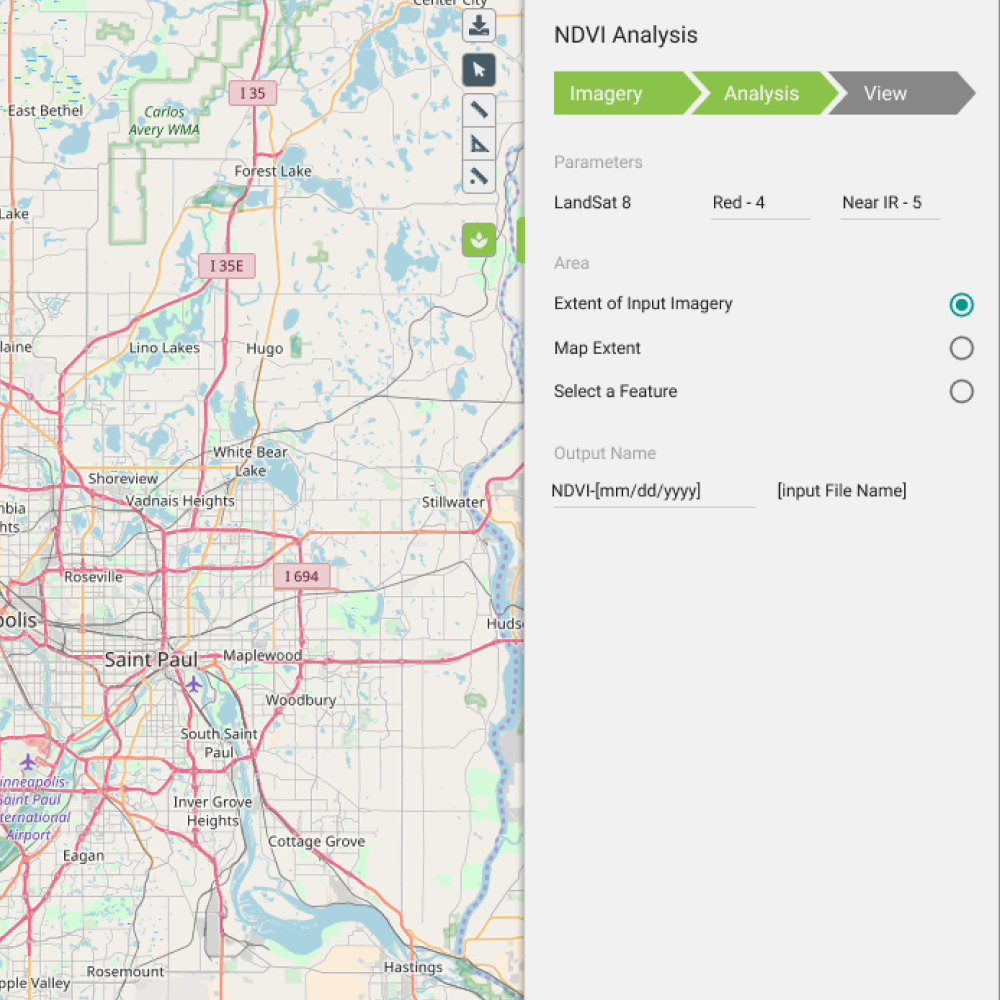
Draw area of interest and configure image parameters
Challenge
NDVI workflows were powerful but opaque, tuned for GIS specialists rather than the broader set of analysts and integrators who needed to run vegetation analysis inside Boundless Server. Parameter sprawl and unclear output options created support burden and failed jobs.
- Technical pipeline hidden behind expert-only terminology
- No guided path from map selection to server-ready output
- Errors surfaced late, after long processing runs
Approach
I structured the flow as three clear steps: define the area of interest on a map, configure image parameters with sensible defaults and inline validation, then select output formats compatible with Boundless Server ingestion.
Progressive disclosure kept advanced GDAL-style options available without blocking first-time users. Each step confirmed inputs before allowing the user to advance, reducing failed batch jobs.

Output options with server integration preview
Outcome
- Accessible NDVINon-specialists could run vegetation analysis without CLI expertise.
- Server-ready outputsExport options matched Boundless Server integration paths.
- Fewer failed jobsStep validation caught parameter issues before processing started.